Acquisition allocation and consideration reconciliation PowerPoint Template
Editable acquisition allocation and consideration reconciliation worksheet with a fictional worked example and a fill-in slide. Preview both pages; download the 2-slide PPTX for 1 credit.
View in library · PPTX · 1 credit
Sign in to download. One credit unlocks the complete 2-slide file; repeat downloads are free.
When to use this template
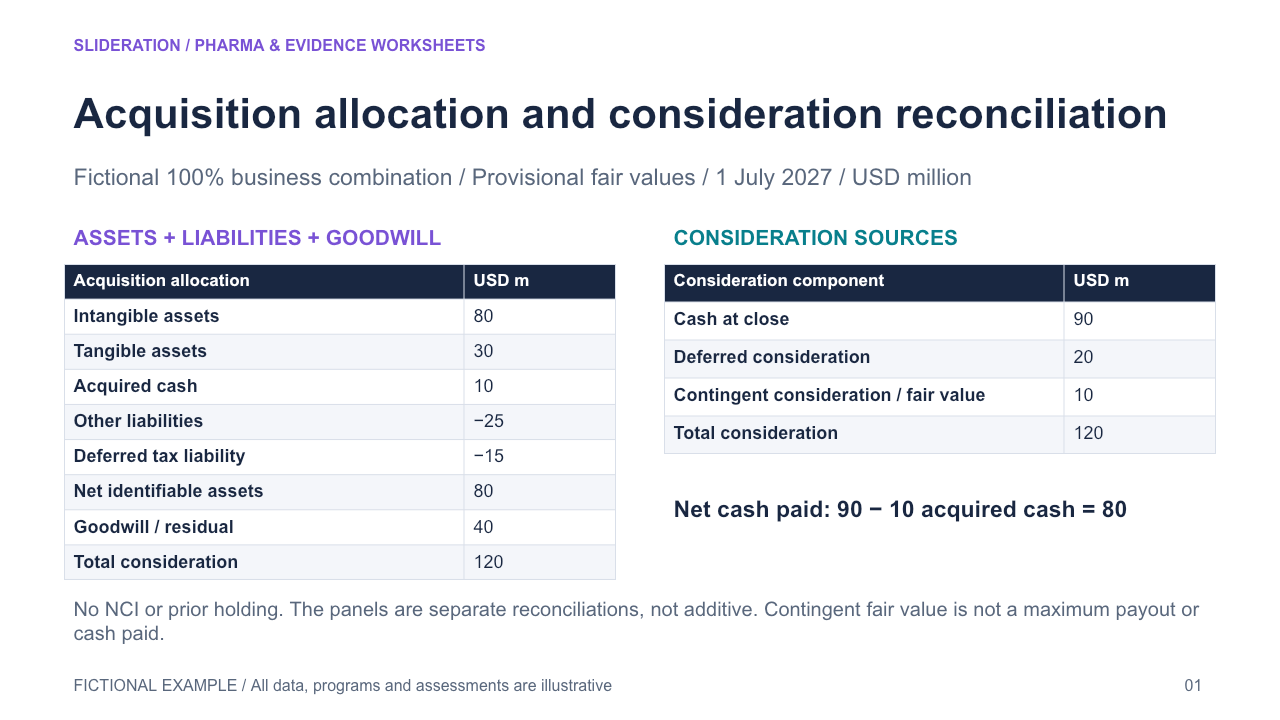
Reconcile signed identifiable assets and liabilities to net assets, residual goodwill and total consideration; separately reconcile the financing components to the same consideration total. A growth bridge has one identity; contingent payout schedules show contractual triggers rather than acquisition-date fair-value allocation.
What you can edit
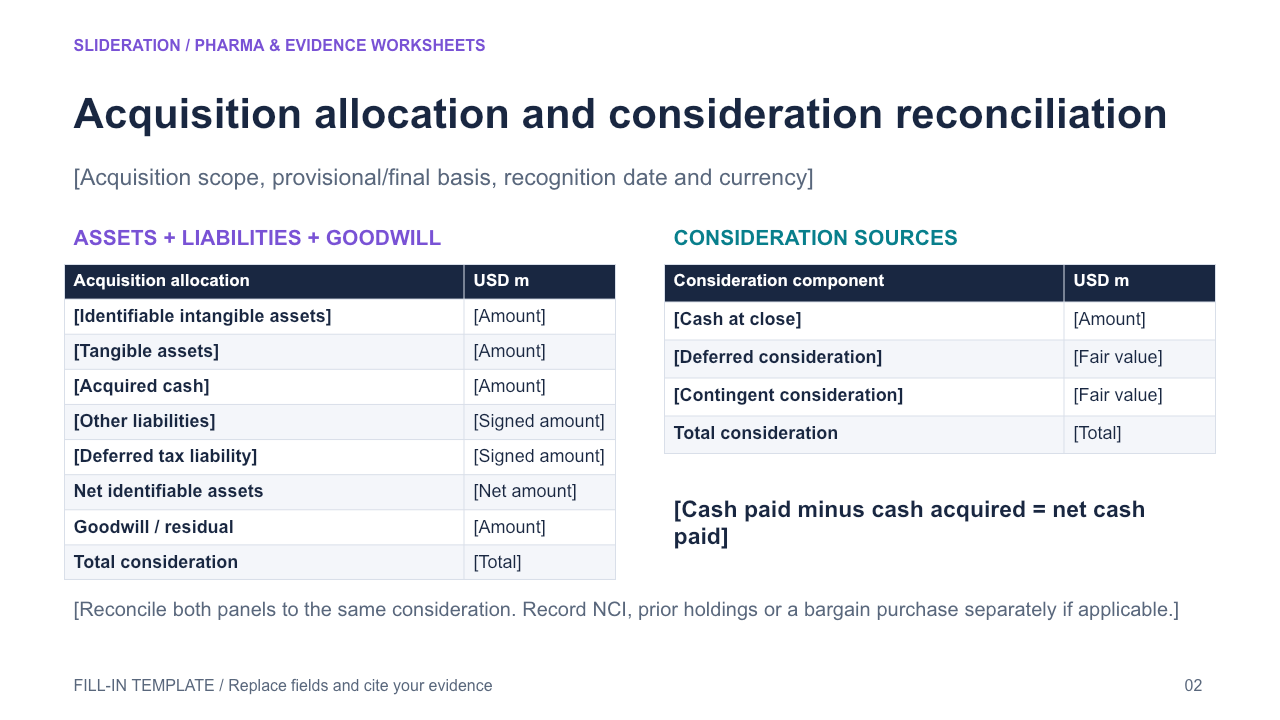
Edit the text, table cells and any native chart data in PowerPoint. The second slide keeps the structure and provides replacement fields. Chart templates use zero seed values on the fill-in slide; replace these together with the associated definitions and tables.
Use the evidence correctly
Use fictional provisional acquisition-date fair values on one currency basis. Separate business-combination accounting from asset acquisition. State the no-NCI/no-prior-holding simplification. Contingent fair value is neither a maximum payout nor cash paid. Acquired cash is included in net assets; do not count the two reconciliation panels together.
- Define your population, reporting period, measures and evidence sources.
- Duplicate the fill-in slide and replace every bracketed field and chart value.
- Check units, denominators, labels and conclusions against your source before presenting.
View in library · PPTX · 1 credit
Sign in to download. One credit unlocks the complete 2-slide file; repeat downloads are free.
All example content is fictional. Original Slideration template; no company endorsement. Use in your own presentations and client work under our slide licence. Redistribution or resale of template files is not permitted.
Will this fit your material?
- Expression purpose
- Explain a numerical change
- Structure in this file
- Acquisition allocation and consideration reconciliation — Reconcile signed identifiable assets and liabilities to net assets, residual goodwill and total consideration; separately reconcile the financing components to the same consideration total. A growth bridge has one identity; contingent payout schedules show contractual triggers rather than acquisition-date fair-value allocation.
- Prepare before editing
- A baseline, an ending value, signed contributions or a consistently defined time series.
- Density and capacity
- Use the preview’s existing number of panels, rows and labels as your starting capacity. For more content, split the story across slides before shrinking text. Table dimensions below describe this file, not a maximum.
- Choose another layout when
- Use fictional provisional acquisition-date fair values on one currency basis. Separate business-combination accounting from asset acquisition. State the no-NCI/no-prior-holding simplification. Contingent fair value is neither a maximum payout nor cash paid. Acquired cash is included in net assets; do not count the two reconciliation panels together.
- Editing effort
- For a bridge, contributions must reconcile. For a trend, keep the period and unit consistent. This is an editable template, not automatic content replacement. You supply and verify the content.
What can I edit?
- Native PowerPoint tables: 9 rows × 2 columns, 5 rows × 2 columns on the first slide, including any header rows. Edit cells directly.
- First-row fields: Acquisition allocation / USD m. Replace these fields and their associated values together.
- First-row fields: Consideration component / USD m. Replace these fields and their associated values together.
- No native chart on the first slide. Chart-like graphics use individual objects; update shapes and labels separately rather than expecting an Excel data sheet.
- Text and shapes remain editable. Check the preview for any illustrative pictures; picture content is replaced as an image.
2 slide(s) in the complete file. Includes a worked example and a fill-in slide.